Amazon Label Processor is a free tool that automatically adds SKU and Quantity to your Amazon shipping labels. Simply upload your raw label PDF, and the tool processes it instantly, making labels easier to sort, pack, and manage during order fulfillment.
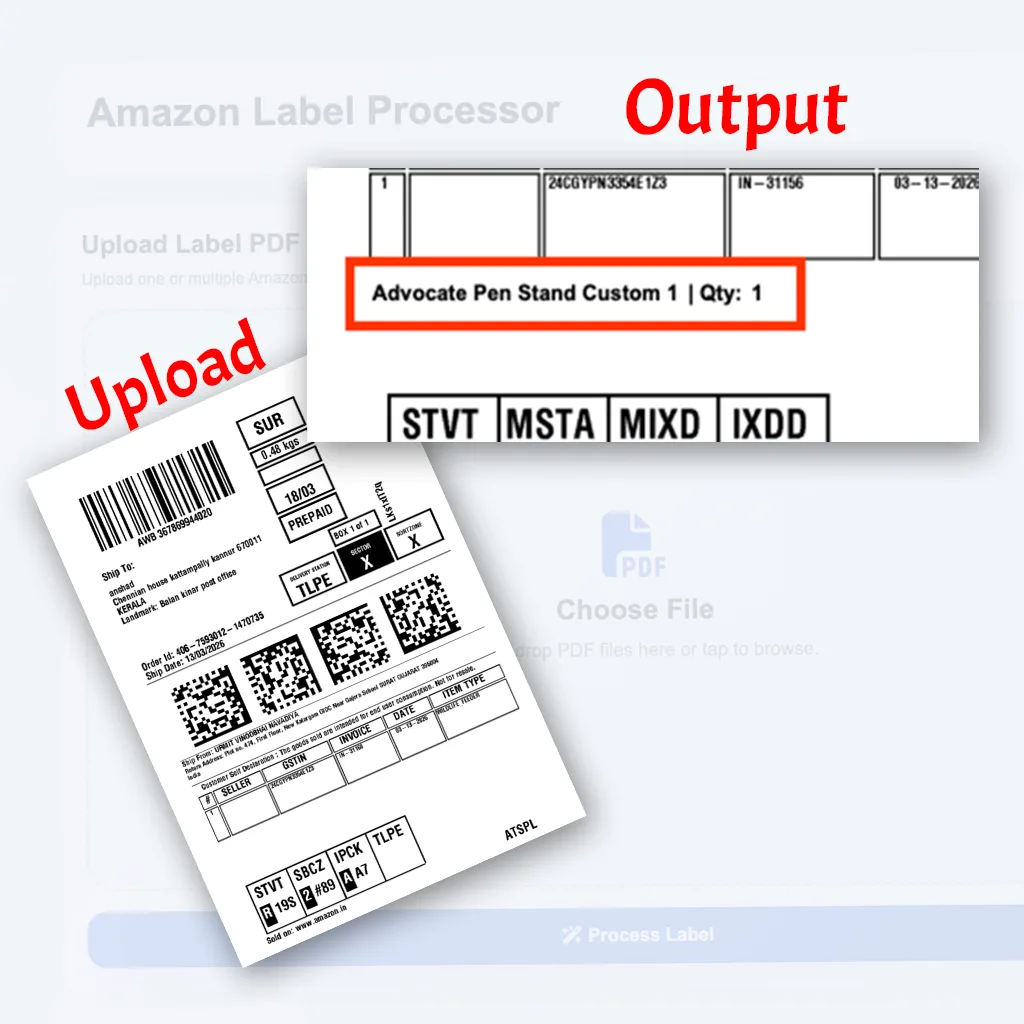
The tool automatically adds the product SKU to your Amazon shipping label, making it easier to identify products during packing.
It prints the product quantity clearly on the label so your packing team can quickly verify the order without opening invoices.
Upload one or multiple Amazon label PDFs and process them instantly without manual editing.
The processed labels are optimized for direct printing, ensuring clear visibility of SKU and quantity.
Quickly identify products on labels without checking order details separately.
Clearly visible SKU and quantity help minimize mistakes during order fulfillment.
Automates a manual task that normally takes extra time when processing labels.
Use the tool without any subscription or hidden charges.
Simple steps to start using this tool quickly and smoothly.
Upload your Amazon shipping label PDF file to the tool.
The tool scans the label and automatically adds SKU and quantity information.
A new label file is generated with SKU and quantity clearly displayed.
Download the processed label and print it for your order packing.
Claim this free tool and use it from your dashboard.
Yes, Amazon Label Processor is completely free to use.
Yes, you can upload a PDF containing multiple labels and process them together.
No, the tool only adds SKU and quantity information while keeping the original label intact.
No installation is required. The tool works directly in your web browser.
Amazon Label Processor is a free tool that automatically adds SKU and Quantity to your Amazon shipping labels. Simply upload your raw label PDF, and the tool processes it instantly, making labels easier to sort, pack, and manage during order fulfillment.